- <GetStart>
- CSPro User's Guide
- The CSPro System
- Data Dictionary Module
- Introduction to Data Dictionary
- Organization
- Dictionary Concepts
- Data Dictionary Application
- How to ...
- Open an Existing Dictionary Application
- Move Around a Dictionary
- View the Dictionary Layout
- Add Dictionary Elements
- Modify Dictionary Elements
- Add or Modify Levels
- Add or Modify Records
- Add or Modify Items
- Add or Modify Value Sets
- Linked Value Sets
- Generate Numeric Value Set
- Add or Modify Values
- Undo and Redo Changes
- Select Several Dictionary Elements
- Insert Dictionary Elements
- Delete Dictionary Elements
- Move Dictionary Elements
- Find Dictionary Elements
- Document Dictionary Elements
- Convert Items to Subitems
- Select Relative or Absolute Positioning
- Create Dictionary with No Record Types
- Occurrence Labels
- Add or Modify Relations
- Print the Dictionary File
- Save Dictionary as New File
- Multiple Language Dictionaries
- Dictionary Macros
- Dictionary Analysis
- Dictionary Security Options
- The CSPro Language
- Data Entry Module
- Batch Editing Applications
- Tabulation Applications
- Data Sources
- Synchronization
- CSPro Statements and Functions
- Text Templates
- Templated Reporting System
- HTML, Markdown, and JavaScript Integration
- Action Invoker
- Appendix
- <CSEntry>
- <CSBatch>
- <CSTab>
- <DataManager>
- <TextView>
- <TblView>
- <CSFreq>
- <CSDeploy>
- <CSPack>
- <CSDiff>
- <CSConcat>
- <Excel2CSPro>
- <CSExport>
- <CSIndex>
- <CSReFmt>
- <CSSort>
- <ParadataConcat>
- <ParadataViewer>
- <CSCode>
- <CSDocument>
- <CSView>
- <CSWeb>
Generate Numeric Value Set
To generate a value set for a numeric data item:
- From the dictionary tree, select the desired item.
- Right-click on the view on the right, or select the Edit menu.
- Select Generate Value Set. The following dialog box will appear:
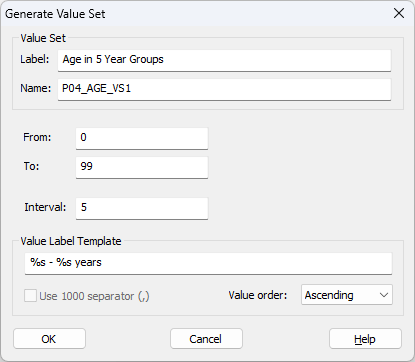
Value Set Label: A descriptive text label for a collection of categories of an item. Used by the Tabulation module to select tabulation categories. This cannot be left blank.
Value Set Name: The name of this value set for use in the CSPro language procedures.
From: The smallest value in the value set.
To: The largest value in the value set.
Interval: The size of the interval in each value range generated. For example, if 5-year age groups are desired, then the interval is 5. The interval must be greater than 0. If the interval is the smallest positive number that can be contained in the data item, then single values are produced.
Value Label Template: A model for descriptive text of each value or value range that is generated. The characters %s in the template are replaced by the from and to values for each value range. All other characters are output as entered. To use a percent sign in the template, write %%.
Use 1000 separator: When checked, the values will be formatted with thousand separators, formatted according to the locale. For example, the number 123456789 might be formatted as "123,456,789" or "12,34,56,789".
Value order: By default, values are created in ascending order, but can be modified to be created in descending order.