2015-11-12 Beta Release Notes


This is intended as the final beta before the CSPro 6.2 release.

Major new features:

  • Multiple language dictionaries: Select Edit->Languages in the dictionary editor to add languages to your application. Unique labels can be added in each language. When creating forms, the "link field label to dictionary item" drag property ensures that the field labels will be modified when the dictionary language is changed, keeping the labels in sync.
  • Value set images have now been fully implemented on both Windows and Android environments. The file formats supported include: .jpg, .gif, .bmp, .png, and .tif.
  • Applications can define resource folders that contain auxiliary files that the application uses. These files will be compressed in the .pen file and decompressed when running the application.

Minor features:

  • Android case tree changes: individual fields can be hidden in the tree; by default skipped fields will no longer be shown in the tree.
  • Windows extended controls have been improved, with navigation buttons and search functionality.
  • System messages as defined in CSProRuntime.mgf can be overridden.
  • File handlers can now be passed as arguments to user-defined functions.
  • The Android application can now be installed to a device's SD card.
  • Dictionary Macro options for compacting and sorting data files, as well as an Open With (CSPro tool) option.

New logic functions:

  • prompt: Prompts the operator to enter an alphanumeric string, also supporting a password masking option.
  • round: Returns a value rounded to the nearest integer.
  • connection: Determines whether the device has access to the Internet.
  • getimage: Returns the filename of a value set image.

2015-03-20 Beta Release Notes


(View the previous beta release notes, from 2015-02-04.)

Release Notes for 20 March 2015

  • The Android case tree now uses colors to show whether a field has been entered, skipped, etc., as on the desktop (though with different colors).
  • The synchronization routines now support peer-to-peer syncing using Bluetooth. (This is in addition to the current Dropbox and FTP synchronizations.) When using Bluetooth sync, you set one device as the "server" and the other as a "client." The server has no intelligence, and it is the client's responsibility to get and put the appropriate files. For an example of Bluetooth sync, see this simple Bluetooth sync demo where one file is sent from the client to the server. For a more advanced example, run the CSEntry File Transfer application.
  • Checkbox fields are now easier to work with because the alpha field no longer needs to be the combined length of all possible selections. For example, if you have 10 selections and each selection is 1 character, you no longer have to make the alpha field length 10. You could make it length 3, and that would support 3 selections. This also makes it easier to use checkboxes with dynamic value sets. For an example of this (as well as using lookup files), run this Population Projector application.
  • The display of the Android case tree can be turned off (e.g., for a menu program) from Data Entry Options.

2015-02-04 Beta Release Notes


(View the previous beta release notes, from 2015-01-17.)

Release Notes for 4 February 2015

  • A new logic function, publishdate, returns the date and time that the code was compiled. This value can be used to determine when your .pen file was created.
  • Users can now search the case tree on Android devices.
  • Small improvements and bug fixes, including fixing a bug that caused CSEntry to crash on some Android devices, including many 7" tablets.
  • If you want to create .pen files from the command line (e.g., in a batch script), then you can write:

    "%ProgramFiles(x86)%\CSPro 6.0\CSEntry.exe" /pen "My Program.ent"

    On a 32-bit machine, remove the "(x86)" from the above code.

2015-01-17 Beta Release Notes


Thank you for agreeing to be a CSPro beta tester. You must have CSPro 6.0 installed on your machine in order to install this beta. There are significant changes in CSPro 6.1, including changes to the format of the various CSPro files (.ent, .fmf, etc.), so if you makes changes to existing applications using this beta, you may not be able to read those files in previous version of CSPro. The beta version of the Android application can be found here: CSEntry_20150117.apk.

As always, if you have any comments or suggestions, or if you experience any bugs, please email cspro@lists.census.gov. If you are running the CSEntry Android application and you experience a crash, a file named crashreport.txt will be created in the csentry folder. Emailing that file to the support email group will help us fix bugs.

We plan to release CSPro 6.1 officially within the next two months, so if you have any feature requests, email them to the support email address before February. If you are interested in CSPro training, there is an intermediate workshop, focused on Android development, taking place in Washington, DC in June. There is a beginning workshop in August. Addidtionally, the Census Bureau may be able to provide in-country training for your organization. More information about the training can be found here or you can email ipcta@lists.census.gov.

Release Notes for 17 January 2015

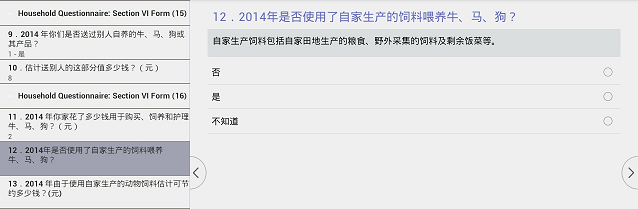
  • On Android tablets, the case tree now appears alongside the currently-asked question. This facilitates navigation, and provides context for your survey. Using the menu, tablet users can hide the case tree is so desired. On phones, the case tree is still shown by clicking on the CS icon at the top-left of the screen.

    20150117multipleQuestions

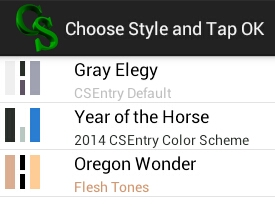
  • Also on Android devices, the colors of the case tree can be modified. Select "Style Options" from the menu. There are now three color options, but more will be added. In addition, users will eventually be able to customize the colors.

    20150117styles

  • Users using Android 5.0 (Lollipop) should no longer experience bugs that caused CSEntry to crash using this new version.
  • The Android application now reads in persistent fields specified in the .pff file just as the Windows version does.
  • We have added French and Spanish translations for some of the strings used in CSEntry on Android devices. If you would like to translate the strings to your language, or would like to suggest different translations for French or Spanish, please email cspro@lists.census.gov.
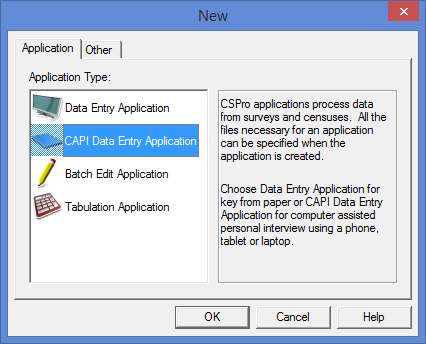
  • When creating new applications, there is now a "CAPI Data Entry Application" type. This creates a data entry application but with CAPI-specific options, such as using system-controlled mode, using the CAPI window, and not asking for an operator ID. All of these options could previously be modified using Options->Data Entry, but selecting this option may save you some time.

    20150117newApplication

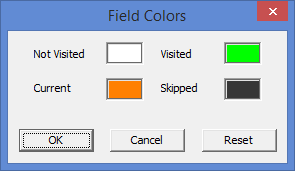
  • The field colors used on the Windows version of CSEntry can now be modified by selecting Options->Field Colors.

    20150117fieldColors

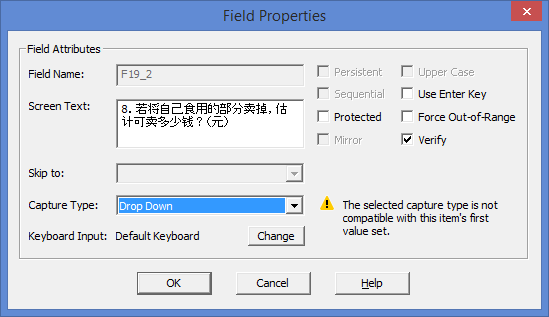
  • The field properties dialog has been streamlined, so that the capture type can be selected from that dialog instead of a second dialog. In addition, capture types that do not match the current value set for the item can be selected, which simplifies working with dynamic value sets (by eliminating the need for a setcapturetype function call from within logic).

    20150117fieldProperties

  • CSPro specification files no longer save a timestamp when referencing a file. In the past, a file might look like this:

    [AppCode]
    File=6/3/2014 10:45:41 AM,.\Census Data Entry.ent.apc
    [Message]
    File=6/3/2014 10:45:41 AM,.\Census Data Entry.ent.mgf

    Now that same file looks like this:

    [AppCode]
    File=.\Census Data Entry.ent.apc
    [Message]
    File=.\Census Data Entry.ent.mgf

    This makes using CSPro with a version control system (such as git) more convenient, as the .ent, .bch, .fmf, etc. file won't change upon every slight modification.
  • Export fixes: Exports to SPSS now export long labels, eliminating the previous 120 character limit. Chinese and other Unicode characters are now properly exported in SAS format.
  • New logic functions direxist and dircreate work like their file counterparts:

    string backupDirectory = pathname(inputfile) + "Backups";

    if not direxist(backupDirectory) then
       
    dircreate(backupDirectory);
    endif;

  • A new logic function, getdeviceid, can be used to return a unique ID on Windows or Android devices. On Windows, it returns the MAC address. On Android devices, it returns the device's ANDROID_ID. In both cases, it returns a string variable.

    PROC USER_NAME

       
    if not loadcase(USER_PERMISSIONS_DICT,USER_NAME) then
           
    errmsg("The entered user name is not in the database of users.");
           
    reenter;

       
    elseif USER_ALLOWED_DEVICE <> getdeviceid() then
           
    errmsg("You, %s, do not have permission to use device %s.",strip(USER_NAME),getdeviceid());
           
    reenter;

       
    endif;

  • Multiple parameters can be specified in the [Parameters] section of a .pff file and accessed using the sysparm function. For example, in the past you might have sent information to your application this way:

    [Parameters]
    Parameter=0205

    PROVINCE = tonumber(sysparm()[1:2]);
    DISTRICT = 
    tonumber(sysparm()[3:2]);

    Now, you can simplify this and make it more readable:

    [Parameters]
    PROVINCE=2
    DISTRICT=5

    PROVINCE = tonumber(sysparm("PROVINCE"));
    DISTRICT = 
    tonumber(sysparm("DISTRICT"));

    As before, calling the sysparm function without a parameter will return whatever was passed via the Parameter= line.
  • The following functions that affect the case tree on Android are candidates for inclusion in CSPro 6.1. Showocc and hideocc show or hide occurrence labels, and setocclabel allows for the dynamic modification of the label displayed on the case tree. If you think such functions would be useful, let us know so that we keep them in the 6.1 release.

    function UpdateOccurrenceDisplay()

       
    do ctr = 1 while ctr <= maxocc(PERSON_FORM)

           
    if ctr > HH_ROWS or PERSON_DELETED(ctr) = 1 then
               
    hideocc(PERSON_FORM(ctr));

           
    else
               
    showocc(PERSON_FORM(ctr));
               
    setocclabel(PERSON_FORM(ctr),strip(PERSON_NAME(ctr)));

           
    endif;

       
    enddo;

    end;

  • The following type and function are also candidates for inclusion in CSPro 6.1. A list is a variable-length array, either numeric or string. In the future, it may be possible to add to and edit this kind of variable, but for now it is read-only and can only be retrieved using the dirlist function, which returns a directory listing. If you might use this kind of functionality, let us know so that we keep it in the 6.1 release.

    PROC GLOBAL

    list string fileListing;

    PROC SAMPLE

       
    numeric ctr;

       
    write("Listing of data files:");

       
    // the wildcard argument and the recursive argument are optional
        dirlist(fileListing,"C:\Survey\Data","*.dat",recursive);

       
    do ctr = 1 while ctr <= length(fileListing)
           
    write("Name: %s – Length: %d",fileListing(ctr),filesize(fileListing(ctr)));
       
    enddo;

  • There are many enhancements to the sync tool on Android devices. In addition to many bug fixes, there is now an updated user interface for setting up synchronizations, which should clarify many questions and problems that users have faced with setting up a synchronization routine. Synchronization routines can now be initiated by copying over a .pnc file to your device over USB, and basic synchronization files can be generated automatically for you from a .pff file located on your device, on Dropbox, or on an FTP server.

    20150117sync

  • The synchronization routine can be launched from logic using the sync function. The routine can occur immediately, or can be queued to occur after the user has finished adding cases. This may be a useful way to make sure that the data on your server matches what has been collected without requiring the user to manually sync.

    PROC MY_APPLICATION_FF

    preproc

        sync(
    "mySyncFile.pnc",queue);

    CSEntry will first look on your file system for the synchronization file (in the above case, in the same folder as the .pen file), and if it does not find it there, it will look in the device's sandbox, which is where .pnc files are normally stored.
  • Other bug fixes and feature enhancements, including to the Reformat Data, Tabulate Frequencies, and Export XML Metadata tools.

CSPro 6.0.1 Released!


A new version of CSPro has been released, 6.0.1. This is a major release, as it also involves the release of the CSEntry Android app. Now data entry applications can be run on Windows, as before, but also on Android phones and tablets. For more information on this version, click on the CSPro 6.0.1 tag to read previous posts highlighting various new features.

Download the new version here, and as always, you can access older versions on the Software page.