Check out the tools page for a newly released tool. The Record Cleaner removes records of a type not listed in the dictionary and adds required records that are not present. This tool will prevent you from getting "Invalid Record type" or "Required Record or Group ______ not found" messages when you process your data. It will also give you a limited report showing you what records were inserted and deleted.
2014-05-01 Beta Release Notes
Many features and language improvements have been added to CSPro for today's May 1 beta release. As usual, we have also made minor improvements and fixed some bugs. If you experience any bugs while running your applications, in either the Android or Windows environment, please email cspro@lists.census.gov. Here is a summary of the features added since the March beta:
- The .pen application file has been dramatically reduced in size, which makes deploying it to the Android device (and updating it) much quicker. This means that you must recreate all of your .pen files while testing this new version.
- In the last beta release we added a new string type to the CSPro language. Now you can declare traditional alpha variables, as well as these new strings, locally. In the past this was only possible with numeric variables. So now you can write:
PROC FIELD1
alpha (50) localVariable = "This is a locally declared alpha variable.";
errmsg("%s",localVariable);
PROC FIELD2
string localVariable = "This is a locally declared string and is different from the above variable.";
errmsg("%s",localVariable);
- Alpha and string objects can be concatenated using the + operator as an alternative to using the concat function. For example:
string part1 = "Hello", part2 = ", ", part3 = "World!";
errmsg("%s",part1 + part2 + part3); // displays: Hello, World!
- The Android version now respects the upper case attribute. Cases are also marked as partially saved in the case listing. A search button has been added to the show / selcase graphical interface.
- A new "tablet" mode exists on the desktop for CSEntry. With the PFF property FullScreen=NoMenus, not only will the case/file tree on the left be hidden (as occurs with FullScreen=Yes), but the menus and toolbars will also be hidden. This mode is ideal for conducting data entry on tablets.
- A new tool, the PFF Editor, has been added to the suite of CSPro tools. This tool allows you to edit PFFs without needing a text editor. It can be useful as it displays all of the options available to an application developer for a given type of PFF.
- Setvalueset, when provided with array parameters, has always been a way of creating dynamic value sets. Now you can pass one-based arrays to the function, in addition to the traditional zero-based arrays. If the zeroth element is blank, setvalueset will start processing at the first element of the array.
- The accept function now accepts arrays as option parameters, which allows for more dynamic queries. For example:
PROC GLOBAL
array string acceptOptions(20);
// ...
numeric ctr;
do ctr = 1 while ctr <= count(NAME)
acceptOptions(ctr) = "Interview " + NAME(ctr);
enddo;
acceptOptions(ctr) = "All Interviews are Complete";
acceptOptions(ctr + 1) = ""; // mark the end of the array
numeric selection = accept("Select an Option",acceptOptions);
// ...
- There is a new function, showarray, that is similar to the show function, except that instead of displaying items from rosters or records, it displays information located in an array. Here is an example of how it might be used:
PROC GLOBAL
array string showValues(20,3);
// ...
numeric ctr;
do ctr = 1 while ctr <= count(NAME)
showValues(ctr,1) = NAME(ctr);
showValues(ctr,2) = getlabel(SEX,SEX(ctr));
showValues(ctr,3) = maketext("%d-years-old",datediff(AGE(ctr),sysdate("YYYYMMDD"),"y"));
enddo;
showValues(ctr,1) = ""; // mark the end of the array
numeric selection = showarray(showValues,title("Name","Sex","Age"));
// ...
- A set of three new functions has been added: setvalue, getvalue, and getvaluealpha. They can be used as a way of assigning to and retrieving values from dictionary items by using the item name as an alpha field. For example:
Realistically you would not use the function if the variable name that you are assigning to is known. But, for example, if you want to add a button to your userbar that the interviewer can click on to assign missing values to various fields, you could write:
function DoMissing()
setvalue(getsymbol(),missing);
end;
// ...
userbar(add button,"Missing",DoMissing);
Or for a more complicated example, here is code that could be used to write out customized .csv reports based on the parameters specified in an array. By adding, removing, or reordering the strings in the array, you would get a different report without having to touch any other code.
PROC GLOBAL
array string PrintOptions(20) = "NAME","SEX","AGE";
// ...
numeric ctr,recCtr;
for recCtr in PERSON_REC
string output;
do ctr = 1 while PrintOptions(ctr) <> ""
if ctr > 1 then
output = output + ",";
endif;
if getvalue(PrintOptions(ctr)) <> default then // then the field is numeric
output = output + maketext("%f",getvalue(PrintOptions(ctr)));
else
output = output + strip(getvaluealpha(PrintOptions(ctr)));
endif;
enddo;
write("%s",output);
endfor;
2014-03-26 Beta Release Notes
A few features have been added to the the March 26 beta release:
- A string type has been added to the CSPro logic language. This is similar to the alpha type, except that it is of variable length, meaning that it can be used more simply than alpha variables. There is no longer a need to use the strip function on your strings for many operations. In the past you might write this:
alpha (300) myFolderName,myFileName;
setfile(inputFile,concat(strip(myFolderName),strip(myFileName)));
Now you can simply write:
- A case tree has been added to the Android version. You can bring this up by swiping from the left side of the screen to the center. It is further documented in the Android beta release notes. Note that if you have .pen files created with the old beta version, you will have to recreate them, as the structure of the file has changed.
- The gps function now has an optional accuracy component. Instead of returning the first reading, you can specify that you want to wait for a reading of certain accuracy. For example:
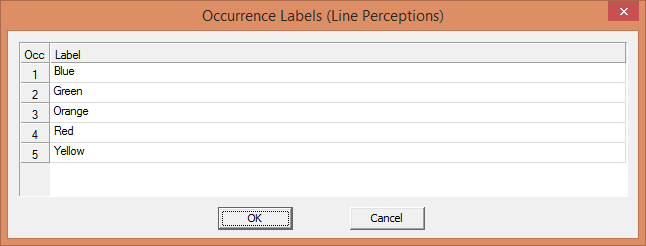
- You can now define occurrence labels in the dictionary. For example, if you open the dictionary for the Metro Survey application, click on the Line Perceptions record, and select Edit -> Occurrence Labels, you will see the following dialog:

You can define occurrence labels for multiply occurring records and multiply occurring items. When dragging these records/items to a form, you will be prompted in the Drag Options window if you want to use the occurrence labels instead of 1, 2, 3, ... for the row labels. In addition, you can access these in logic using a new function, getocclabel. For example:
In your CAPI text, you can also refer to the current occurrence label. In the Metro Survey it is used as follows: Do you agree with the following statement: "The rail cars on the %getocclabel% line are generally clean." - There are two new features in the Dictionary Macros. You can copy/paste item lengths now, in addition to names and labels. You can also bulk add items to records.
- In addition to the above, we have fixed bugs and added some minor features and improved functionality.
Android Beta Released
The beta version of the CSEntry application for Android devices has been released. If you would like to test it, please visit the beta page. CSPro 6.0, along with this application, will be officially released in a few months.
Android Update
It has been a long time since anything has been posted here, but it is because we are busy working on the Android version of CSEntry. We have made good progress, and hopefully we can release an alpha version of this in a month or two. If you would like to be notified of the alpha release, please sign up on the beta software page.
The first release will be targeted mostly at phone users, as it will be one-question-per-screen. Later we will add support for multiple questions on a screen. As with the old Pocket PC version, you will design your application on the desktop and then deploy it to your Android device to run the program.