- <GetStart>
- CSPro User's Guide
- The CSPro System
- Data Dictionary Module
- The CSPro Language
- Data Entry Module
- Batch Editing Applications
- Tabulation Applications
- Introduction to Tabulation
- Parts of a Table
- Parts of the Table Tree
- Common Uses of Tabulation
- Capabilities of Tabulation
- Creating Tables
- Formatting Tables
- Creating Tables by Geographic Area
- Printing Tables
- Tabulation Preferences
- Saving and Copying Table Data
- Table Post Calculation
- Run Production Tabulations
- Advanced Table Topics
- Table Tips and Tricks
- Data Sources
- Synchronization
- CSPro Statements and Functions
- Text Templates
- Templated Reporting System
- HTML, Markdown, and JavaScript Integration
- Action Invoker
- Appendix
- <CSEntry>
- <CSBatch>
- <CSTab>
- <DataManager>
- <TextView>
- <TblView>
- <CSFreq>
- <CSDeploy>
- <CSPack>
- <CSDiff>
- <CSConcat>
- <Excel2CSPro>
- <CSExport>
- <CSIndex>
- <CSReFmt>
- <CSSort>
- <ParadataConcat>
- <ParadataViewer>
- <CSCode>
- <CSDocument>
- <CSView>
- <CSWeb>
Run Consolidate Interactively
The Consolidation process reads the table matrix file(s) output from Tabulate process, and produces another table matrix file (*.TAB) based on consolidation specifications given in the tabulation application.
When the Consolidate process is selected, the following files are requested:
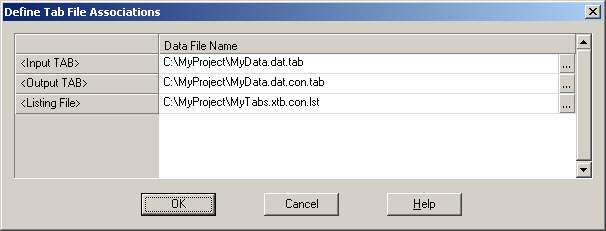
Input TAB: The tabulated table matrices file(s) to be consolidated. Multiple input *.TAB files can be selected using the browse button. The *.TAB extension is required.
Output TAB: The consolidated table matrices file created [or replaced] from the input TAB file(s). This TAB name must be different from the input name and the extension is required.
Listing File: The report generated for the run showing area codes found in the data and tables available for those codes. Blank 'codes' indicate summary levels. The .LST extension is not required.
This is a sample of a listing file for a Consolidation process:
CSPro Process Summary
+----------------------------------------------+
| 1568 Slices Read ( 100% of Input file) |
+----------------------------------------------+
Process Messages
PROVINCE DISTRICT Table Names
-------- -------- -----------
TABLE1 TABLE2 TABLE3 TABLE4
1 TABLE1 TABLE2 TABLE3 TABLE4
1 1 TABLE1 TABLE2 TABLE3 TABLE4
1 2 TABLE1 TABLE2 TABLE3 TABLE4
1 3 TABLE1 TABLE2 TABLE3 TABLE4
1 4 TABLE1 TABLE2 TABLE3 TABLE4
1 5 TABLE1 TABLE2 TABLE3 TABLE4
. . .
Tables 1, 2, 3 and 4 are available for the following geographies:
Total [Country] indicated by Province and District = blank
Province 1 indicated by Province = 1 and District = blank
Province 1 and District 1 indicated by Province = 1 and District = 1
Etc.
See also: Run Tabulate Interactively, Run Format Interactively