- <GetStart>
- CSPro User's Guide
- The CSPro System
- Data Dictionary Module
- The CSPro Language
- Data Entry Module
- Batch Editing Applications
- Tabulation Applications
- Introduction to Tabulation
- Parts of a Table
- Parts of the Table Tree
- Common Uses of Tabulation
- Capabilities of Tabulation
- Creating Tables
- Create a New Tabulation Application
- Create a Table
- Create Tables with Multiple Variables
- Implications of Data Dictionary Value Sets
- Tabulate Items with Multiple Occurrences
- Tally Attributes for a Variable
- Tally Attributes for a Table
- Add, Insert, and Delete Tables
- Move Between Tables
- Run a Tabulation Application
- Renaming Tables and Table Applications
- How To ...
- Formatting Tables
- Creating Tables by Geographic Area
- Printing Tables
- Tabulation Preferences
- Saving and Copying Table Data
- Table Post Calculation
- Run Production Tabulations
- Advanced Table Topics
- Table Tips and Tricks
- Data Sources
- Synchronization
- CSPro Statements and Functions
- Text Templates
- Templated Reporting System
- HTML, Markdown, and JavaScript Integration
- Action Invoker
- Appendix
- <CSEntry>
- <CSBatch>
- <CSTab>
- <DataManager>
- <TextView>
- <TblView>
- <CSFreq>
- <CSDeploy>
- <CSPack>
- <CSDiff>
- <CSConcat>
- <Excel2CSPro>
- <CSExport>
- <CSIndex>
- <CSReFmt>
- <CSSort>
- <ParadataConcat>
- <ParadataViewer>
- <CSCode>
- <CSDocument>
- <CSView>
- <CSWeb>
Renaming Tables and Table Applications
CSPro automatically assigns a name to each table in the application, such as TABLE1, TABLE2, etc. These names are displayed in the table tree (when "names in tree" is checked on the view menu), shown in certain error messages, and used in table post calculation.
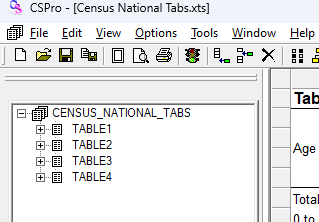
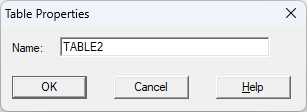
You can change the name of a table using the Table Properties dialog. Right-click on the table in the Tables tree and choose Properties. Edit the name of the table and click OK. Note that the system will not allow you to have two tables with the same name.
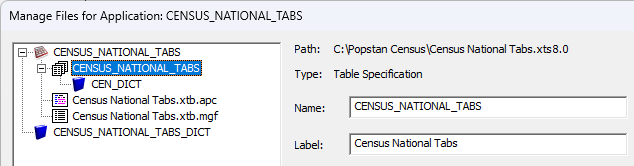
You can also change the name and label of the table application by opening the File menu and selecting Manage Application Files.
See also: Manage Application Files