- <GetStart>
- CSPro User's Guide
- The CSPro System
- Data Dictionary Module
- The CSPro Language
- Data Entry Module
- Introduction to Data Entry
- Data Entry Application
- General Data Entry Concepts
- CSPro Data Entry Concepts
- Create a Data Entry Application
- Change Data Entry Characteristics
- Forms Designer
- Introduction to Forms Design
- Add Things to a Form
- Modify Things in a Form
- Change Form Properties
- Change Forms File Properties
- Change Level Properties
- Change Form Properties
- Change Block Properties
- Change Field Properties
- Change Field Properties for Multiple Fields
- Change Keyboard Input
- Change Roster Properties
- Change Report Properties
- Change Column Heading Properties
- Change Row Heading Properties
- Change Text Properties
- Data Entry Editing
- CAPI Data Entry
- Network Data Entry
- Android Data Entry
- Batch Editing Applications
- Tabulation Applications
- Data Sources
- Synchronization
- CSPro Statements and Functions
- Text Templates
- Templated Reporting System
- HTML, Markdown, and JavaScript Integration
- Action Invoker
- Appendix
- <CSEntry>
- <CSBatch>
- <CSTab>
- <DataManager>
- <TextView>
- <TblView>
- <CSFreq>
- <CSDeploy>
- <CSPack>
- <CSDiff>
- <CSConcat>
- <Excel2CSPro>
- <CSExport>
- <CSIndex>
- <CSReFmt>
- <CSSort>
- <ParadataConcat>
- <ParadataViewer>
- <CSCode>
- <CSDocument>
- <CSView>
- <CSWeb>
Change Forms File Properties
Right-click on the form file ( ) on the tree (topmost entry) and choose Properties, or open the File menu and select Manage Application Files.
) on the tree (topmost entry) and choose Properties, or open the File menu and select Manage Application Files.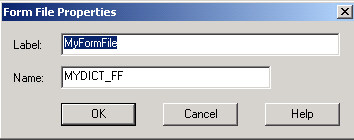
Label
This is descriptive text that helps you identify the current forms file. It may contain any characters (including blanks).
Name
This is the name of the forms file which you would use when writing programming logic. It must consist of letters, digits and the underscore ('_') character. It must not begin or end with underscore.
You can see either labels or names on the forms tree. Press Ctrl+T to switch back and forth between them.
See also: Manage Application Files