- <GetStart>
- CSPro User's Guide
- The CSPro System
- Data Dictionary Module
- The CSPro Language
- Data Entry Module
- Batch Editing Applications
- Tabulation Applications
- Introduction to Tabulation
- Parts of a Table
- Parts of the Table Tree
- Common Uses of Tabulation
- Capabilities of Tabulation
- Creating Tables
- Formatting Tables
- Formats for a Part of a Table
- Formatting Row, Column, or Cell Data
- Formats for a Table
- Formats for an Application
- Formats for Printing
- Views of Tables
- How To ...
- Customize Table Text
- Hide or Show a Row or Column
- Hide Rows Containing All Zeros
- Change the Number of Decimal Places Displayed
- Add a Footnote (Pagenote or Footnote)
- Add Header/Footer Text to a Table
- Add a Subtitle
- Add Stub Leadering
- Add Borders
- Add Reader Breaks
- Change the Way Numbers are Displayed
- Change the Automatically Generated Text
- Change Fonts or Colors
- Change Indentation or Alignment
- Add Borders to Cells
- Make Captions Span Data Cells
- Reset Format of Table Item to Default
- Change the Repeating of Boxheads
- Change Stub Column Position
- Creating Tables by Geographic Area
- Printing Tables
- Tabulation Preferences
- Saving and Copying Table Data
- Table Post Calculation
- Run Production Tabulations
- Advanced Table Topics
- Table Tips and Tricks
- Data Sources
- Synchronization
- CSPro Statements and Functions
- Text Templates
- Templated Reporting System
- HTML, Markdown, and JavaScript Integration
- Action Invoker
- Appendix
- <CSEntry>
- <CSBatch>
- <CSTab>
- <DataManager>
- <TextView>
- <TblView>
- <CSFreq>
- <CSDeploy>
- <CSPack>
- <CSDiff>
- <CSConcat>
- <Excel2CSPro>
- <CSExport>
- <CSIndex>
- <CSReFmt>
- <CSSort>
- <ParadataConcat>
- <ParadataViewer>
- <CSCode>
- <CSDocument>
- <CSView>
- <CSWeb>
Change Fonts or Colors
There is no "global" way to change fonts or colors in a table. The formats of the individual elements, e.g., Title, Spanner, Caption, etc., must be individually modified to replace the 'default' fonts and colors. To do so, right-click on the element and choose Format (<name of table part>) from the menu to bring up the Format (Table Part) dialog.
There is also the option to change the default formats for each of these elements. The modifications will take effect immediately in ALL the tables. See Preferences and Default Formats for more information.
In both circumstances, specific or default formats, the font and color are changed in the 'Font and Color' section of the format (Table Element) dialog.
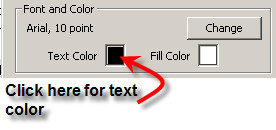
To change the font, click on the 'Change' button and select the font characteristics from the available list.
To change the text or fill (background) click in the color box and select from the choices given.
See Also: Preferences and Default Formats