- CSPro Getting Started Guide
- Introduction
- Installation
- CSPro Tutorial
- About the Tutorial
- Exercise 1: Create a Data Entry Application
- Exercise 2: Create the Data Dictionary
- Exercise 3: Create the Data Entry Forms
- Exercise 4: Enter Data
- Exercise 5: Tabulate Data
- Exercise 6: Modify the Table
- Exercise 7: Add Edits to the Data Entry Application
- Exercise 8: Run a Batch Application
Step 3: Change the Title Font
(Exercise 6, Modify the Table)
CSPro gives you great control over the format of your tables. As an example, in this step we will change the font of our table's title to make it bigger.
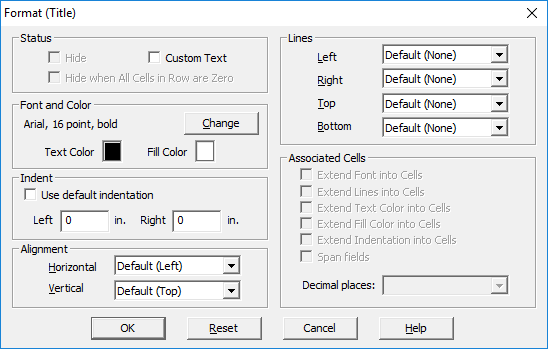
- Right-click on the title Table 1. Age by Sex at the top of the table.
- Select Format (Title) from the right-click menu.
- In the section of the dialog box marked Font and Color click on the Change button.
- In the Font dialog box that appears, change the Size from 12 to 16.
- Click OK to close the Font dialog box.
- Click OK to close the Format (Title) dialog box.
When you have completed this step you should see that the title is now larger.
This completes this exercise. Continue to the next exercise: Step 1: Write Logic for the Edit.