- CSPro Getting Started Guide
- Introduction
- Installation
- CSPro Tutorial
- About the Tutorial
- Exercise 1: Create a Data Entry Application
- Exercise 2: Create the Data Dictionary
- Exercise 3: Create the Data Entry Forms
- Exercise 4: Enter Data
- Exercise 5: Tabulate Data
- Exercise 6: Modify the Table
- Exercise 7: Add Edits to the Data Entry Application
- Exercise 8: Run a Batch Application
Step 2: Select Items to Tabulate
(Exercise 5, Tabulate Data)
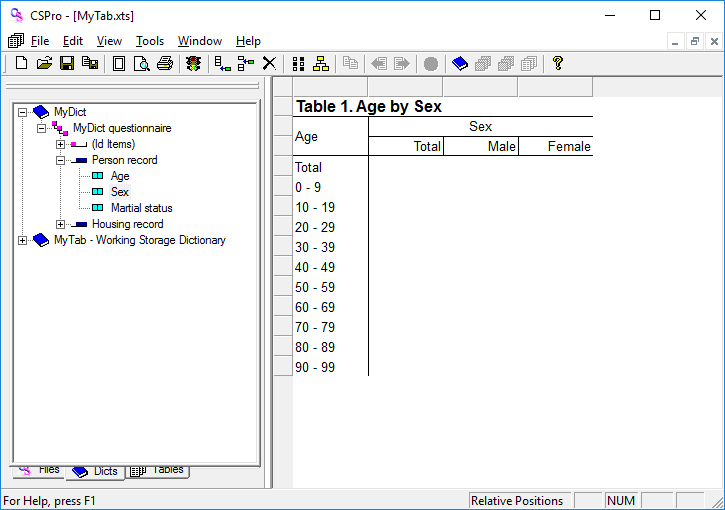
We will create a tabulation of Age by Sex. Age will appear as the rows and Sex as the columns.
- Click on the + next to Person record to make sure its items are showing on the tree.
- Drag and drop Age from the tree to the left side of the table. (Click on Age and hold the mouse button down while you move the mouse to the side of the table then release the mouse button.) The drop point should be in the white space next to one of the gray boxes along the side.
- Drag and drop Sex from the tree to the top of the table. (Click on Sex and hold the mouse button down while you move the mouse to the top of the table then release the mouse button.) The drop point should be in the white space just under one of the gray boxes along the top.
Tips for creating tabulations:
- The item you drag from the dictionary tree will become either a row item or a column item depending on where you drop it. Imagine a diagonal line from the top left to the bottom right of the table. An item dropped on the left/under that line becomes a row item. An item dropped on the right/above that line becomes a column item.
- You can remove an item from the table by clicking on any of its associated labels then dragging and dropping it back to the dictionary tree.
When you have completed this step the screen should look something like:
Continue to the next step: Step 3: Run the Tabulation.